 Comentality
Release
Events2Code 1.0: form handlers, off the form
Event handler registrations made in the form designer live in the form’s XML: one entry per control, per event, with the library and the function name typed in by hand. Rename the function in source and the form stays registered against the old name until a user opens it and the console says so. No compiler, no find-all-references, no test covers the wiring.
Events2Code moves the wiring to where the tools you already use can reach it.
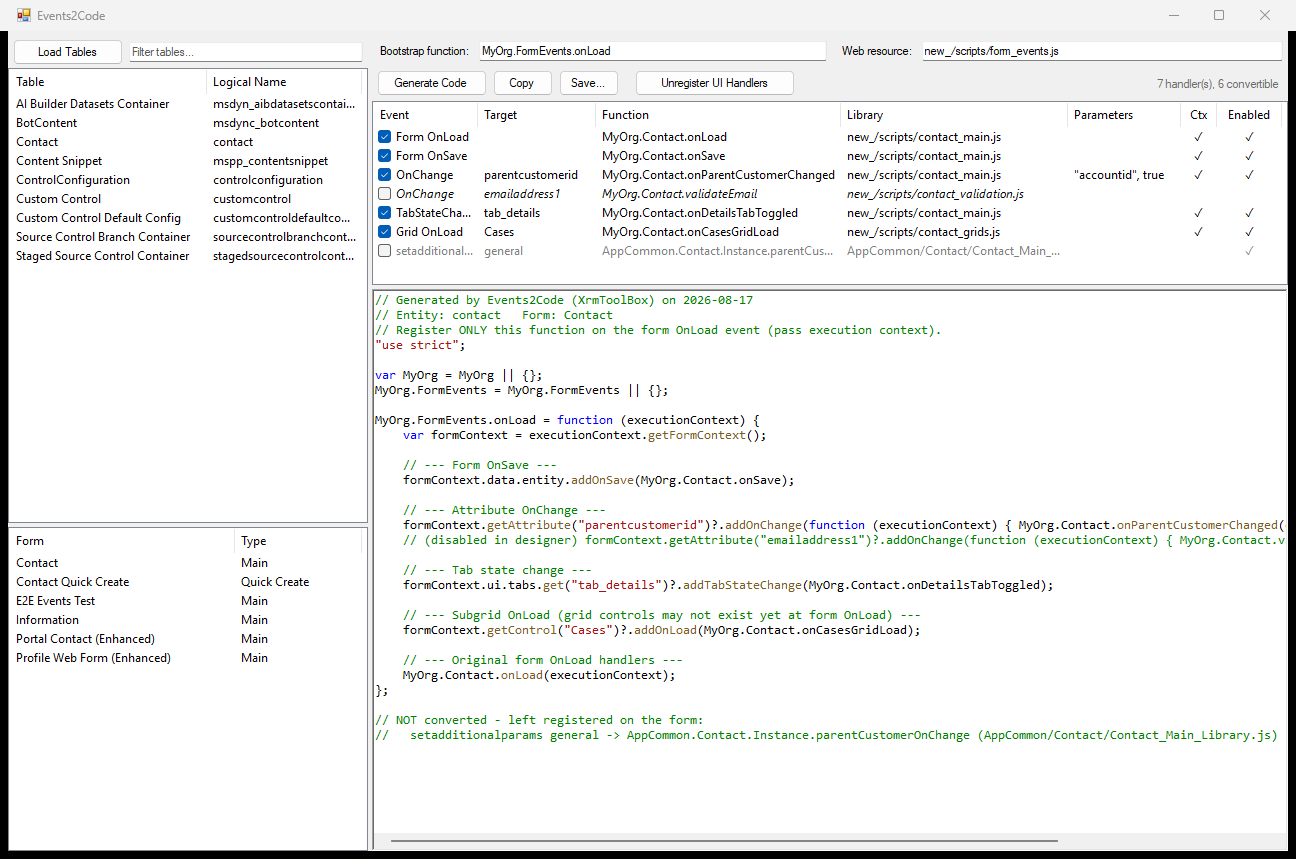
What it does
- Browses tables and their Main and Quick Create forms over the XrmToolBox connection, with a filter on display or logical name.
- Lists every event handler a form registers through the designer, with its event, target, function, library, extra parameters, execution-context flag and enabled state.
- Generates one OnLoad bootstrap that registers the checked handlers
through the Client API:
addOnSave,addOnChange,addTabStateChange, andaddOnLoadfor subgrids. Lookups are guarded with?., so a target missing from the current form variant is skipped rather than throwing. - Keeps the designer’s quirks. Extra parameters and the “pass execution context” flag come through as wrapper closures; disabled handlers are emitted commented out; anything it cannot convert is listed as a comment at the bottom, not dropped.
- Copies the code to the clipboard or saves it as a
.jsfile. - Unregisters the checked handlers, on request: they leave the form XML, the bootstrap is registered on form OnLoad, the web resource is added to the form libraries, and the table is published.
What it does before touching anything
The form XML is backed up to Documents\Events2Code\backups before any
change, and the tool warns on managed forms. Handlers Dynamics owns, the
<InternalHandlers>, are never converted or removed. Generate and Copy are
read-only; only Unregister writes, and only to the form you have in front of
you.
Needs XrmToolBox 1.2025.7 or later, .NET Framework 4.8, and a connection whose user can update forms and publish customisations.
Install
Search for Events2Code in the XrmToolBox Tool Library. The source is MIT.
The note that led here is Handlers that live in the form, not the file.