 Comentality
Search
Making 21,698 icons findable: notes on scoring a search
Comentality Icons is an XrmToolBox tool that puts an icon on a Dataverse table. It bundles 21,698 icons from six sets — Fluent, Phosphor, Lucide, Tabler, Font Awesome and Solar — inside its own DLL, because the people who use it are often on a laptop behind a customer’s proxy that allows Dataverse and nothing else.
Bundling the icons was the easy half. The hard half is that the person typing has one vocabulary and the icon sets have another. Dataverse names tables after what they mean — Account, Opportunity, Entitlement, Work Order. Icon sets name icons after what they depict — building, trophy, ticket, clipboard. No set has ever drawn an icon called “account”.
This is a set of notes on closing that gap, in the order the work actually happened, including the parts that went wrong.
1. Find out what you are already throwing away
The first move was not to add anything. It was to check what the sets already publish and the build script was discarding.
Font Awesome ships every name it has ever used as a separate file: address-card also arrives
as contact-card and as vcard, three files holding one drawing. The build dropped 683 of
those files, correctly — a drawing under three names shows up three times in the grid, and the
tool recognises a stored icon by what it draws, so a drawing under three names is recognised as
none of them. But the names went out with the files. Searching for vcard found nothing, and
the drawing it names sat in the library under a word nobody had typed.
579 names against 479 icons, recovered by keeping the names when you drop the files.
Step: before sourcing new vocabulary, audit what your ingest pipeline discards. The cheapest words you will ever get are the ones you already had and threw away.
2. Check the repository, not just the package
Four of the six sets publish per-icon tags. Fluent, the set the tool leads with, appeared to
publish none — @fluentui/svg-icons carries 21,682 SVGs and no JSON at all.
That turned out to be true of the package and false of the project. Microsoft writes a
metadata.json for each icon in the fluentui-system-icons repository:
{
  "name": "Shield",
  "description": "Used to represent security, safety & protection.",
  "metaphor": ["security", "protection", "safety"]
}
2,654 files, about nine of the bundled icons in ten, MIT under the same licence as the drawings.
Cloud answers to storage, upload, download, save, sync. Key answers to security, lock,
password, access, keychain. These are exactly the words a Dataverse customiser types and the
icon does not have — supplied, for free, by the people who drew it.
Two deliberate exclusions in the package’s own package.json keep this data out of npm. An
issue asking for it to be published has been open since December 2024. If we had trusted the
package we would have concluded the data did not exist, and the next step would have been to
write thousands of keywords by hand.
Step: when a package looks like it has no metadata, look at the project that builds the package. Publishing pipelines drop things.
3. Keep the new words out of the paths they will corrupt
The obvious implementation is to append the new words to whatever array search already matches against. It is also wrong, in two ways that do not show up until later.
In this codebase that array fed two other things. The display name in the grid was built by
joining it — so tags would have ended up in the label under the picture. And the score
subtracted points for words in the icon’s name that the query had not accounted for, to make
person rank above person_money. Appending tags to that array would have made every tagged
icon rank worse on its own name, in proportion to how well it was documented.
The words went into their own properties, read by the scorer and by nothing else.
Step: find every consumer of your existing token list before adding to it. A search index that is also a display string is two things wearing one name.
4. Decide what each kind of word is worth — and say why
By the end there were four kinds of word attached to an icon, and the interesting work was deciding the order.
| the icon’s name, matched exactly | 100 |
| a retired name the set published for the same drawing | 100 |
| the icon’s name starting with your word | 60 |
| a curated mapping from a Dataverse word | 50 |
| what the set says the icon is about | 45 |
| your word inside a name word | 30 |
| a description starting with your word | 25 |
Two of those deserve an argument.
A retired name is worth what a name is worth, because that is what it is. vcard is not a
hint about the drawing, it is a name Font Awesome published for it and later stopped leading
with. Scoring it lower would put the icon somebody asked for by name below every icon with the
word in it somewhere. The consequence — an alias ties with an icon really called that word, and
the tie breaks on the same rule that already settles two icons of one name — is a consequence to
accept, not to engineer around.
A description is worth less than both a name and your own domain mapping. It is a true thing about the drawing, said by the people who drew it. It is still a gloss written for icon browsers rather than for Dataverse. That ordering was not obvious in advance and was, in fact, got wrong the first time. See step 6.
Step: write the ladder down as a table with a sentence of justification per rung. If you cannot say why a tier sits above the one below it, it is a magic number and it will be wrong.
5. Measure the cost, and be careful how
The library is scanned on every keystroke. Adding half as many words again to 21,698 icons sounded expensive, so it was measured.
The first measurement said the cost of a keystroke had doubled. The second said the words had made search faster. Both were nonsense: one run had the benchmark competing with 300 other tests for the machine and the other did not.
The measurement that answers the same way twice is: load both versions into one process and time them alternately, round by round, so whatever else the machine is doing falls on both equally. Done that way the answer is +8% to +13% — 9.4 ms to 10.5 ms for a typical query.
The reason is worth knowing: almost all of a keystroke is the walk over 21,698 entries and the sort at the end, not the per-word comparison. Words are close to free; the walk is not. That single fact changes what optimisation would be worth doing if it ever became necessary.
Step: never compare two separate runs of a benchmark. Interleave the variants inside one process. A benchmark that cannot be trusted is worse than no benchmark, because it will be believed.
6. Look at the result lists, not just the counts
The counts looked fine. Median result growth across 162 real table names was 1.2%, and
nineteen of twenty literal queries — folder, clock, key, cloud, person — had a
byte-identical top eight. A name scores 100 and no description reaches it, so a query that
already worked could not be hurt.
Then fifty-one searches were dumped as before/after lists and actually read.
The tool keeps a small hand-built map of what Dataverse words look like: account is a building, a briefcase, an organization. It was built by running 162 real table names through the search and finding a third of them returned nothing. It scored 15 — a number chosen when nothing else occupied that range, and never revisited.
Descriptions arrived at 60. They did not outrank that map. They deleted it:
accountlostbuilding,briefcaseandorganization— the entire entry — toperson_home,person_alertandphone_person. The grid stopped offering a single usable Account icon.productlostbox,cubeandtagtosurface_hubandsurface_earbuds. A Surface is a product, so Microsoft hardware outranked a box for the Product table.- Twenty-five more words lost a hand-picked answer out of the top of the grid:
invoice,payment,knowledge(all six books),goal,connection,plugin,delivery.
The fix was to put the curated tier above the description tier — 50 against 45, both still below
anything named for your word. Displacements fell from 27 of 92 to 9, and the nine that remain
are variants (star_add, book_open) rather than answers.
Raising the curated tier further, to 70, was tried: it gets to 11 rather than 9, and costs a documented rule about names always winning. Measured, rejected, written down.
The same exercise found two wins that a cruder fix would have thrown away. email used to
return seven voicemail icons — “email” is a substring of “vo-email” — and now returns
envelopes. team used to offer the Steam logo. Both were the curated map losing to junk
substring matches, which is why the answer was not simply to score descriptions below
substrings.
Step: dump before/after result lists for a few dozen real queries and read them. Aggregate metrics told us the change was harmless. It was not.
7. When a search answers for the wrong reason, outrank it — don’t forbid it
Two table names were answering on letters rather than on meaning.
Work Order matched an icon called document_border_print: “order” is inside border, and
“work” came from that icon’s own description, where it means paper work. Unit Group matched
people_community: “unit” is inside community — and a Dataverse unit group is a group of
units of measure, nothing to do with people. Each offered exactly one icon, confidently.
The tempting fix is to stop matching inside words. Don’t: substring matching is why typing
fold reaches folder, and removing it to fix two table names would cost every search that
relies on it.
The fix was to teach the curated map what the words mean — work is a clipboard, a wrench, a toolbox; unit is a box, a scale, a ruler — so the meaning outranks the coincidence on its own. Work Order now leads with a clipboard out of 137 results. Unit Group leads with a stack of boxes.
Step: prefer raising the right answer over suppressing the wrong one. Suppression has costs you will not see; ranking does not.
8. Pin the decisions, not the implementation
Every judgement above is now a test with the argument in its name or its comment:
- a description is worth less than a name and less than the tool’s own word
accountstill offers a building- a search that was answering on letters now answers on meaning
- no table’s suggested search moved when the retired names arrived
- the eleven tables whose suggestion did change, by name, with what each now leads with
The last one matters more than it looks. A side effect nobody noticed — eleven tables changing what they suggest, unprompted — was caught by a test comparing the library against a copy of itself with the new words stripped out. That test is the reason the change was inspected rather than shipped blind.
Step: when you take a judgement call, write the test that will tell the next person it was taken. Not “search works” — “this specific thing beats that specific thing, and here is why”.
9. Read licences from the author’s own distribution
An icon set’s licence was once refused on a GPL field read off npm — which turned out to be a third party’s React wrapper, GPL on their own code, not the author’s terms at all. The set was actually CC BY.
For search vocabulary the same care applies, and one file in particular is worth knowing about:
Font Awesome’s icon-families.json carries both its search terms and every icon’s raw SVG path
data, which straddles that project’s own split between an MIT licence for code and CC BY for the
icons. Its icons.yml carries the same terms and no drawings.
Two sources were checked and rejected: one icon set’s licence sweeps in its tag file and then forbids use in a competing icon library; the academic icon-tagging datasets are share-alike or non-commercial. And a large vendor’s tag data is not in its Apache-2.0 repository at all — only behind an undocumented endpoint with no licence statement of its own.
Step: read the licence off the author’s own distribution, and check who published the package you read it from.
The shape of it
Nine steps, but really three ideas.
Take the words you are already being given — from your own discards, from the repository rather than the package, from the people who drew the thing. 13,061 words arrived here without anybody authoring one.
Give each source a score you can justify in a sentence, and put your own domain knowledge above somebody else’s general-purpose gloss. The hand-built map of 92 Dataverse words is smaller than the 12,482 imported ones by two orders of magnitude and it is worth more, because it is the only part written for the people using the tool.
Then go and look. The aggregate said +1.2% and nineteen of twenty lists unchanged. Reading the lists said the Account table had stopped being offered a single usable icon. Both were true. Only one of them mattered.
Nobody is too big to need this step. While this post sat in draft, @Mattmaximo posted two screenshots of macOS System Settings. The search box suggests Displays. Type Displays, and it finds nothing.
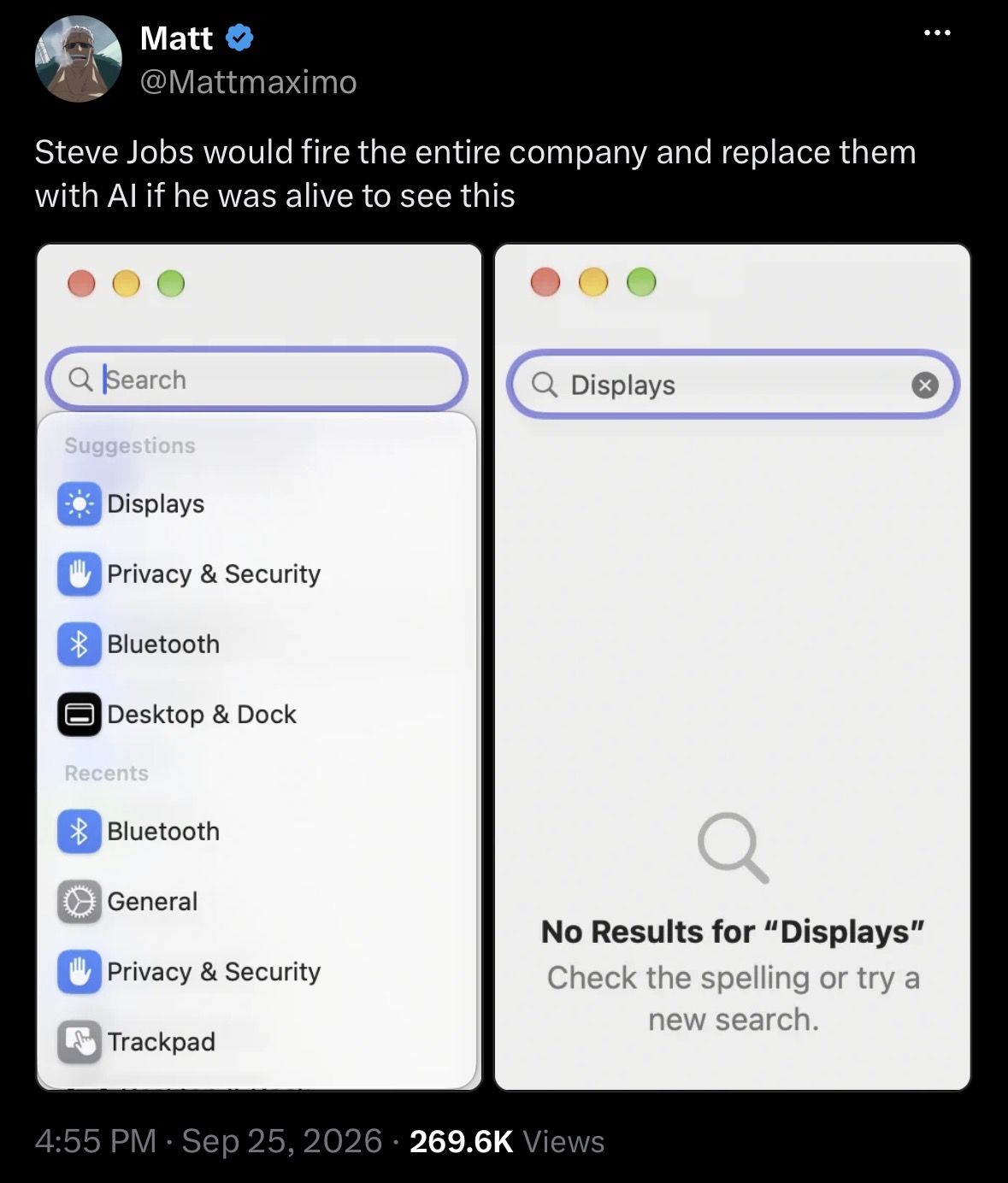
A search that cannot find its own suggestion trips no metric. Somebody has to type the word and read what comes back.